The calendar
Tasks, deadlines and appointments on one month grid — what an appointment carries, which of them a client can see, and the dates it will never work out for you.
3 min readReviewed 29 October 2026
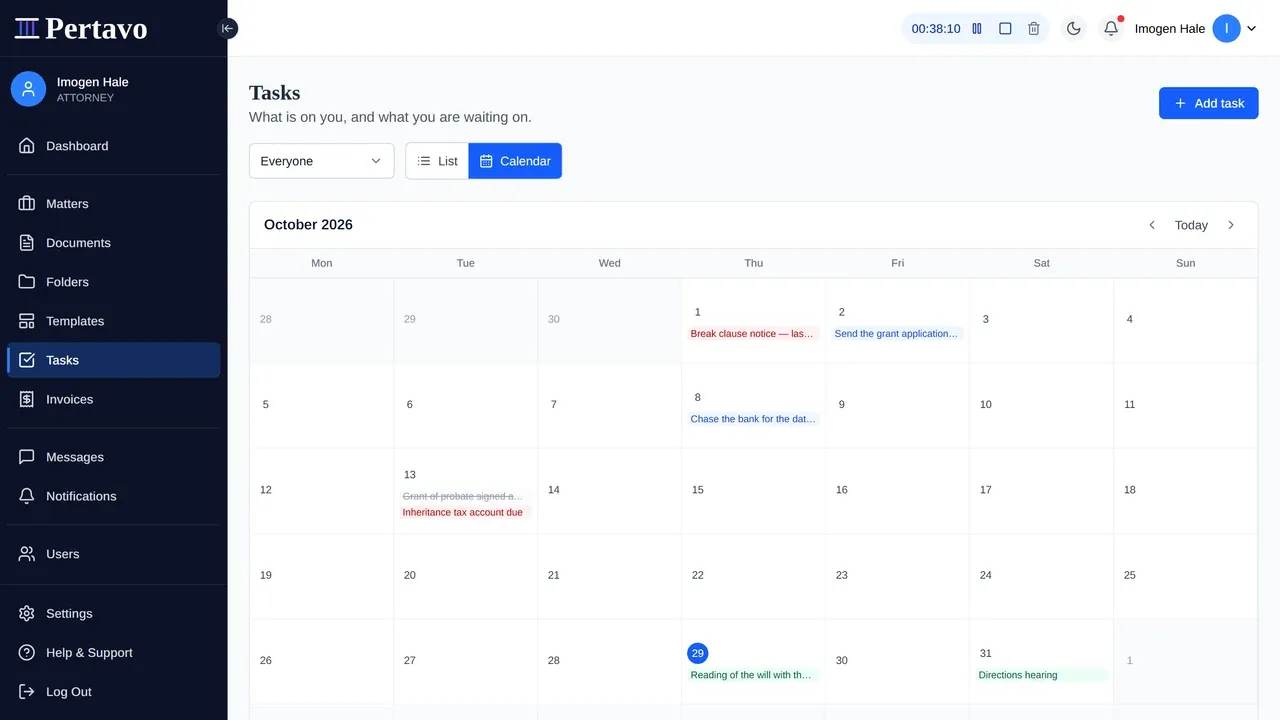
Open Tasks and there is a Calendar beside the list. It is not a calendar of tasks: it carries three kinds of entry at once, because a hearing on Thursday and three tasks due the same morning is the thing a calendar is actually consulted about, and keeping them on separate screens is how one of them gets missed.
- Tasks with a due date — see tasks.
- Deadlines on a matter — the court and limitation dates from deadlines.
- Appointments — hearings, meetings and calls, which exist only here.
Pick a day and that day’s entries are listed under the grid. An accounting firm sees the same screen against engagements.
An appointment
A title, a kind — hearing, meeting, call or other — a start, and an end. Leave the end off and it is an hour, because that is what a meeting is until somebody says otherwise. Mark it all day and it covers the day rather than a time on it.
It can also carry a location, notes, the attendees expected, and the matter it belongs to. An appointment with no matter is fine: a partners’ meeting is not about one file.
The time is the firm’s time
An appointment is stored as an instant, worked out from your firm’s timezone — set once in Settings → Organization. Ten in the morning means ten in the morning where the firm is, and it reads back the same whoever opens it and wherever the server happens to be.
This is worth knowing if your firm has moved or was set up in a hurry: the zone is the one the appointment was read against, so correct it before the diary fills rather than after.
What the client sees, and what they do not
Nothing, unless you say so. An appointment is firm-only when it is made, and sharing it with the client on the matter is a deliberate switch — the direction matters, because a diary that shared by default would eventually show a client something about their own case that nobody chose to tell them.
Share it and the client sees it on their own calendar. Tasks and deadlines keep their own rules: a client sees their tasks, and never the deadline panel.
Inside the firm, the calendar obeys the same ethical walls as everything else. An attorney outside a wall does not learn a court date for a matter they cannot open — a date with the matter’s name beside it would tell them plenty.
What it does not do
- It does not work out a single date. No court rules, no limitation periods, no “fourteen days after service”. Every date here was calculated by a person. Deadlines says this at length and it is the most important sentence in either page.
- It does not remind anybody. No alerts, no reminder emails, no escalation. The calendar makes the weekly look quick; it does not do the looking. If you want these dates where something will nudge you, subscribe to them from the calendar you already watch.
- It sends no invitations. Attendees are a record of who is expected, not an email with an Accept button, and nobody is asked to reply.
- No recurring appointments. A weekly hearing is typed weekly.
- No free/busy across the firm. There is no “when can we all meet”.
- No rooms or resources. Nothing books anything.
This did not answer it?
Sign in and write to us from Help & Support inside the portal — a message from there arrives with your firm and your account already attached, so nobody has to ask you which is which.
Sign in to Pertavo