Dashboard overview
What the first screen is telling you — the two rows of counts, what the money ones mean, and how much less of it a client sees.
3 min readReviewed 29 October 2026
The dashboard is the landing screen after sign-in. It is a summary, not a working screen: nothing lives only here, and every figure on it is a shortcut into the screen that owns it.
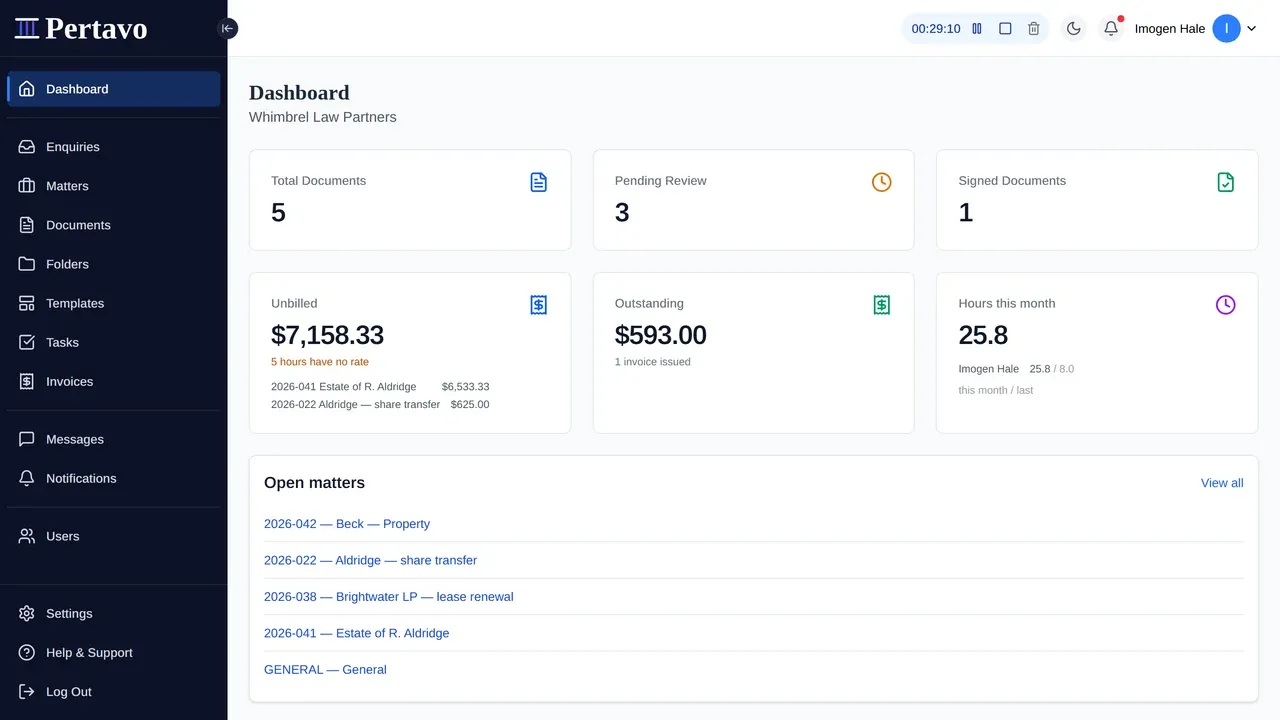
Two rows, and they answer different questions
The documents row is the queue: how much is in, how much is waiting on review, how much has been signed. Treat these as work sitting still rather than as a report — both of the first two are cleared from Documents, not from here.
The money row is what the firm watches rather than works on, which is why it sits underneath:
- Unbilled — work recorded and not yet asked for, with the matters carrying most of it listed beneath. This is the figure nobody can work out in their head, and the one a practice usually discovers too late. If some hours have no rate they are counted separately and said so, because an entry written before a rate existed cannot be billed until somebody sets one.
- Outstanding — sent and not paid, with how many invoices that is. See invoices.
- Hours this month — against last month, per person, so the comparison is the useful part rather than the total.
These three are totalled across matters, and only across the matters you can reach: with ethical walls on, an attorney is totalled over their own files.
The money row shows nothing at all for a firm that has recorded no time and raised no bill. An empty row of zeroes teaches nobody anything.
Under the counts
- Open matters — every live matter by reference and title. The way into the work.
- Recent documents — the latest uploads and changes across the firm, newest first, each row naming the client, who uploaded it and whether it is pending or awaiting a signature.
A firm with nothing in it yet sees a short list of things to do instead, and that list disappears once there is a matter and a client on it.
What a client sees
The same shape, narrowed to them: their own documents, their own recent activity, their own unread messages. A client’s dashboard never counts anything belonging to another client.
The money row is not there at all. What a client owes is on the invoice you send them, not totalled on a screen — and what the firm has not billed yet is the firm’s business.
The sidebar
The navigation is the same on every screen: Dashboard, Enquiries, Matters, Documents, Folders, Templates, Tasks, Invoices, Messages, Notifications and Users, with Settings and Help & Support pinned to the bottom.
Your own name is in the top right, not in the sidebar — with your photo, your role, and one way through to Your Profile.
A client sees a shorter version — no Templates, no Users, no Folders — for the reasons in understanding user roles and permissions.
The timer in the top bar
Staff have a timer in the header on every screen, because the moment one is needed is never the moment you are on the page that owns it. It is described in full under time on a matter. Clients do not have one.
This did not answer it?
Sign in and write to us from Help & Support inside the portal — a message from there arrives with your firm and your account already attached, so nobody has to ask you which is which.
Sign in to Pertavo