Reading uploaded documents with AI
What Pertavo works out about a document on its own, what changes when you switch the AI service on, and exactly which part of a file leaves your firm.
5 min readReviewed 19 November 2026
Every document uploaded to Pertavo is looked at and, where it can be worked out, given a document type. Most of that happens on our own servers and has done since before this setting existed. One part of it is off until an owner turns it on, and that part is the only one that involves anybody outside your firm.
This page is the whole of it: what happens with the switch off, what changes when it is on, and what leaves the building.
With the switch off, which is how every firm starts
The filename is read, on our servers, against a list of patterns. Nothing is sent anywhere and nothing costs anything.
It recognises the ordinary shelf of a small firm: engagement letters, retainer agreements, powers of attorney, court filings, settlement agreements, contracts, correspondence, invoices and receipts, bank statements, identification and insurance policies.
A file called Smith - retainer agreement signed.pdf is typed correctly by this alone. A file called scan0017.pdf is not, and it stays untyped — which is the honest outcome rather than a guess.
What the switch adds
Settings → Organization → “Read uploaded documents with an AI service”. Off by default. Only an owner or an administrator can change it, and anybody else sees the control greyed rather than hidden, so that a setting which exists is never mistaken for one that does not.
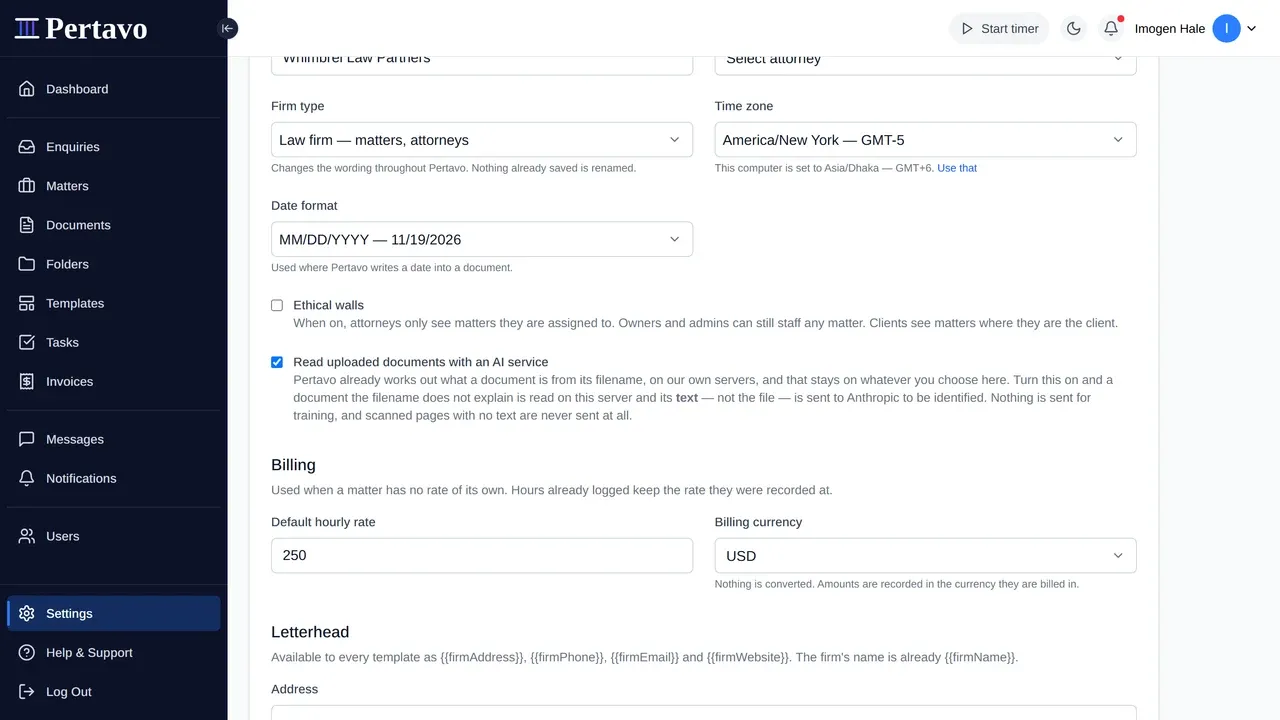
The box is ticked in that picture because the firm in it turned it on. A firm that has never opened this screen has an empty one.
Turned on, one extra step runs only for documents the filename did not explain:
- Pertavo fetches the file back and extracts its text, on our server.
- That text — not the file — is sent to Anthropic, which says what kind of document it is.
- The answer is written to the document’s type.
The firm’s own filing is not involved in that sentence anywhere: no matter name, no client name you did not put in the document, no folder structure.
What never leaves, even with it on
Four things, and they are properties of how it is built rather than promises about intent:
- The file itself. Only extracted text travels.
- A scanned page with no text. If there is no text to extract, nothing is sent. A photographed page of a passport is exactly the case people worry about, and it is the case that never goes.
- Anything, for training. The text is used to answer and not retained for model training.
- Anything at all, from a firm that has not switched this on. The code path that reads the bytes is not supplied when the setting is off. It is not that the request is refused; there is no request to refuse.
The company is named here and on the privacy page rather than described as “an AI provider”, because a firm deciding whether to switch this on cannot make that decision against a phrase.
A guess never overwrites a person
The rule that matters most if you ever see a wrong tag.
Only an empty field is filled. If somebody has already set a document’s type, a classification that disagrees is discarded — the person wins, whether the guess came from the filename rules or from the AI service. Correcting a tag is therefore permanent; it will not be re-guessed on the next edit.
Changing one is the ordinary document type control, and the list it offers is your firm’s own. A tag you disagree with is four seconds of work and no consequence, which is the whole reason this feature is allowed to guess at all.
It cannot break an upload
Classification runs after the document is saved, never before. If the extraction fails, the service is unavailable, the key is wrong or the month’s ceiling is reached, the upload has already succeeded and the document is simply untyped.
The same direction applies to the setting itself: if the setting cannot be read, it is treated as off. Everywhere else in this feature a failure falls back to a weaker answer, because the cost of being wrong is a missing tag. Here the cost of being wrong is a document disclosed, so the firm that never decided is the firm that is protected.
What is recorded
The upload’s entry in the activity history carries what was guessed and what was kept, separately. “The classifier said Settlement Agreement and the field was already filled” is the sentence somebody needs when a tag looks wrong six months later, and it is answerable without asking anyone to remember.
Deciding whether to turn it on
The question is not whether AI is safe. Your documents already sit with a cloud provider, which was settled when you bought any hosted software. What this setting changes is narrower: one additional company sees the text of the documents your filenames do not explain.
For most firms that is an ordinary sub-processor decision, and the things worth checking before making it — training, retention, who is named, what happens when it is off — are the four paragraphs above. Where a matter is under a protective order, or a client negotiated confidentiality terms rather than accepting standard ones, the question is what you agreed to rather than what is permitted generally, and that is worth settling before switching anything on firm-wide.
Nothing here is legal advice, and your own state bar’s rules and opinions govern.
This did not answer it?
Sign in and write to us from Help & Support inside the portal — a message from there arrives with your firm and your account already attached, so nobody has to ask you which is which.
Sign in to Pertavo