Conflict checks
What runs when you open a matter, what it searches, and the four things it cannot know.
2 min readReviewed 23 September 2026
Opening a matter runs a conflict check first. If it finds anything, the matter is not created — you are shown what was found and have to acknowledge it before you can continue.
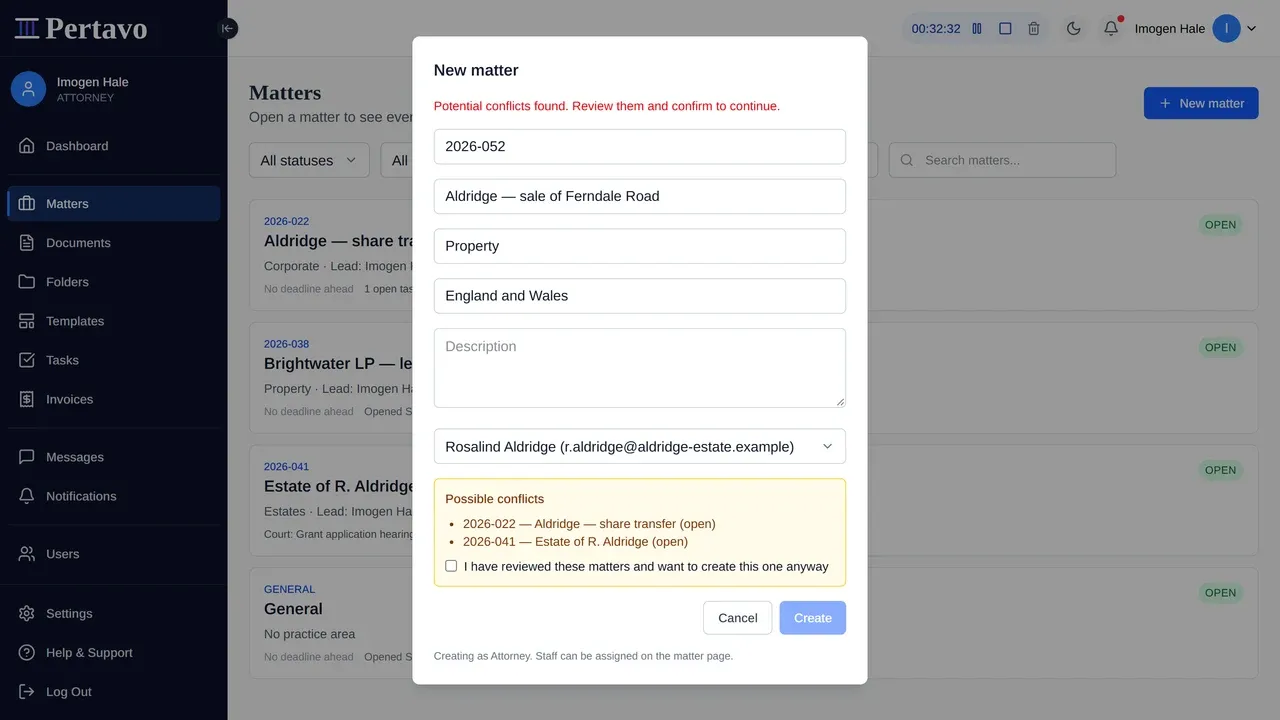
What it searches
Two things, inside your firm only:
- The client. Any other matter where this client is the client.
- The title. Matters whose title resembles the one you are opening, which is what catches the other side of the same dispute when somebody has typed the names in.
Results are listed with their reference, title and status, so you can open the ones you do not recognise before deciding.
Acknowledging
The box reads “I have reviewed these matters and want to create this one anyway”, and it is unticked. Ticking it and pressing Create records that somebody looked.
That wording is deliberate. The check cannot tell you whether a conflict is real — only that these matters share something with the one you are opening. Deciding is a professional judgement, and the tick is where your firm says it was made.
The four things it cannot know
Read this before you rely on it, because the gap between what it searches and what a conflict actually is matters:
- It does not know about other parties. Only the client is recorded on a matter. The person on the other side of a transaction, a beneficiary, a witness, a company’s directors — none of them are in the database, so none of them are searched.
- It does not know your old files. Matters closed before you started using Pertavo are not in it. Neither is anything that lives in your previous system.
- It does not know about people. One client with two accounts, a company and its owner, a married couple with different surnames — these read as unrelated.
- It does not run again. The check happens when a matter is opened. Adding a party later, or opening a related matter elsewhere in the firm, does not re-run it.
So this is a first pass that catches the obvious case and makes somebody look. It is not a substitute for your firm’s own conflict procedure, and it should not be described to a regulator as one.
Who can see the result
Whoever is opening the matter. The list of possible conflicts is shown in the dialog and is not stored anywhere you can read afterwards — the acknowledgement is recorded, the reasoning is not.
This did not answer it?
Sign in and write to us from Help & Support inside the portal — a message from there arrives with your firm and your account already attached, so nobody has to ask you which is which.
Sign in to Pertavo