Templates and generated documents
Keep the letter once, with the matter's details as merge fields, and generate it filed on the matter — ready to send for signature.
4 min readReviewed 26 October 2026
A template is a document you keep once, with the parts that change written as merge fields. Generating it fills those fields from a matter and files the result on that matter.
This is not the PDF editor. The editor marks up a document that already exists; a template makes a new one.
Start from the examples
A new firm is given three worked templates — an engagement letter, a letter to the client and a matter status update — so the first one you look at is a finished example rather than an empty box. If they are not there, Templates → Add example templates writes them.
Writing one
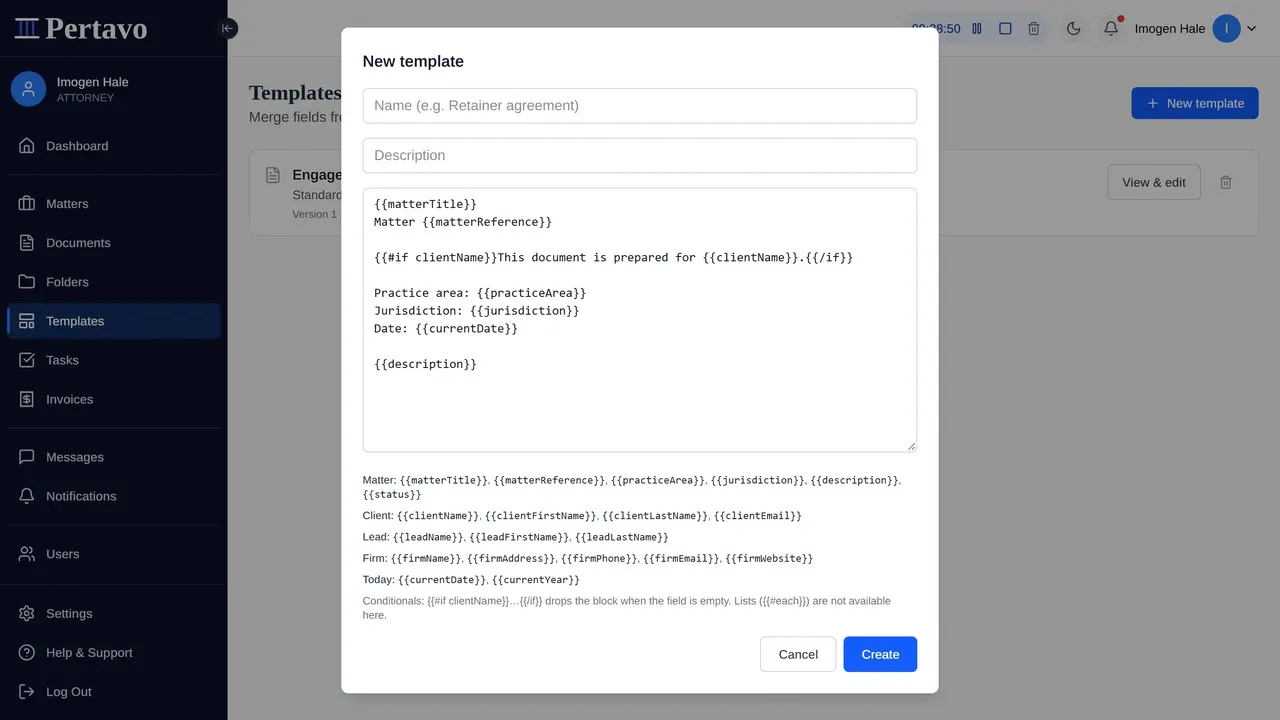
Templates → New template. Give it a name, then write the body with merge fields in double braces:
Dear {{clientFirstName}},

re: {{matterTitle}} ({{matterReference}})

Thank you for instructing us. Your matter will be handled by
{{leadName}}.

{{firmName}}
{{currentDate}}
Anything not in braces is fixed text. Spaces inside the braces are fine: {{ clientName }} and {{clientName}} are the same field.
Field names have no dots in them. {{clientFirstName}}, not {{client.firstName}}. This matters more than it looks: a name the engine does not recognise is removed from the finished document rather than left on the page, so a mistyped field does not announce itself — you get “Dear ,” and nothing to tell you why.
Every field
| Group | Fields |
|---|---|
| Matter | matterTitle, matterReference, practiceArea, jurisdiction, description, status |
| Client | clientName, clientFirstName, clientLastName, clientEmail |
| Lead | leadName, leadFirstName, leadLastName |
| Firm | firmName, firmAddress, firmPhone, firmEmail, firmWebsite |
| Today | currentDate, currentYear |
The firm’s address, phone, email and website come from Settings → Organization, so they are empty until somebody fills them in there.
Leaving a line out when a field is empty
{{#if clientName}}This document is prepared for {{clientName}}.{{/if}}Everything between the two tags is dropped when the field is empty. Use it for the lines that would otherwise read “Prepared for .” on a matter with no client yet.
Generating
From the matter, not from the template. Open the matter, choose the template in Generate from template, and the document is created and filed there in one step. From that point it is an ordinary document: it can be assigned, downloaded, and sent for signature.
Preview beside it fills the template with this matter’s data and shows you the result without creating anything, which is the cheap way to find an empty field before a client does.
Generating the same template onto the same matter twice does not overwrite the first one: the second is “(2)”, the third “(3)”. Last week’s draft and this morning’s are told apart in the list rather than by opening both.
That last hop is the reason the feature is worth having. An engagement letter that is generated, filed and signed without leaving the page is the whole loop this product is for.
What it cannot do
Be direct about the edges, because they decide whether a template is worth writing:
- Output is PDF. There is no editable Word output. If your letter needs to be revised by somebody else before it goes out, a template is the wrong tool.
- Formatting is plain. Headings, paragraphs and line breaks. No tables, no images, no letterhead graphics.
- Fields come from the matter, its client, its lead and your firm’s own details. Anything none of those holds — a completion date, a counterparty’s name — is not available to merge, and there is no way to add one for a single document.
- A generated document does not update. Change the template afterwards and the documents already generated stay as they were, which is what you want for something a client has signed.
Correcting one
View & edit on a template opens it. Fixing a typo in the body changes what the next generated document says and leaves the ones already generated alone, which is the behaviour you want for anything a client has signed.
Where to start
The three that pay for themselves first are the ones every new matter needs anyway: the engagement letter, the authority to act, and the closing letter. Write those, and the rest can wait until you notice yourself retyping something.
This did not answer it?
Sign in and write to us from Help & Support inside the portal — a message from there arrives with your firm and your account already attached, so nobody has to ask you which is which.
Sign in to Pertavo